
Platforms · Analysis
Google Ads channel priority: how Low-priority caps change spend
Google's new channel priority and budget allocation controls only move spend where campaigns are short of budget, and the sources do not show they improve results. A controlled test on cost per conversion is the way to judge them.
- By
- The Cart Plot Editorial
- Published
- Sources checked
- Evidence
- 5 sources
At a glance
- Google's channel prioritisation lets advertisers mark channels High or Low priority and cap spend on Low-priority channels3.
- In a Target CPA or Target ROAS campaign that is not limited by budget, priority generally does not change how spend is distributed2.
- The budget allocation cap is best-effort and calculated on average daily budget, so daily spend may occasionally exceed it2.
- The sources do not show that the settings improve results, so a controlled test on cost per conversion is recommended1,2.
Google's channel prioritisation and budget allocation controls, announced on 14 October 2026, let advertisers mark each channel as High or Low priority and cap spend on Low-priority channels3. For a small store, the setting moves budget only in campaigns that are short of budget, so single-campaign Shopping or Search accounts may see little change2,4. Whether it helps is a question the sources cannot answer. Our recommendation is a controlled test that compares conversions and cost per conversion, not spend share.
What changed, and what the sources confirm
Google's announcement, made by Tal Akabas, Director of Product Management at Google Ads, presents the controls as a way to "Say goodbye to all-or-nothing channel targeting"3. Before this, an advertiser could only switch a network such as Search partners or the Google Display Network on or off1,4.
Channel prioritisation sets each channel or channel grouping to "High priority" or "Low priority". Campaigns fully fund High-priority channels first, within the target if the campaign uses Target CPA or Target ROAS, and then allocate the remaining budget to Low-priority channels3. All channels are set to High priority by default2.
Budget allocation is a separate control that applies only to Low-priority channels. The advertiser sets a maximum percentage of the daily budget for that channel3. Google's help page describes this as a best-effort limit2.
Google's help page says the controls are rolling out progressively and that availability may vary by account, starting on 15 October 20264. If the setting is missing from an account, that is expected4.
Does priority change spend in my campaign type?
The answer depends on whether the campaign is limited by budget and which bidding strategy it uses. Google's help page states that when a Target CPA or Target ROAS campaign is not limited by budget, "priority levels generally don't change how spend is distributed"2. The table summarises the stated behaviour by situation.
| Campaign situation | What the sources state | What to measure before deciding |
|---|---|---|
| Target CPA, Target ROAS or Target CPC, not limited by budget | Priority does not change how budget is spent; any Low-priority allocation still applies2 | Actual daily spend against each cap |
| Target CPA, Target ROAS or Target CPC, limited by budget | High-priority channels spend first, within target; budget moves to Low-priority channels only if they can convert at the target2 | Cost per conversion by channel against your target |
| Maximise Conversions, Maximise Conversion Value, Maximise Clicks, Manual CPC, Target Impression Share | High-priority channels spend first; leftover budget goes to Low-priority channels if High cannot absorb it, for example because of campaign settings or limited eligible traffic2,4 | Qualified conversions by channel, and whether High-priority channels are actually short of budget |
| Shopping | Channels that can be tiered are Google Search and Google search partners4 | Conversions from search partners |
| Performance Max | Google channels, Search partners and the Google Display Network can be tiered; campaign total budgets are not supported4 | Channel performance report |
| Demand Gen | Prioritisation only; budget allocation is not supported4 | Conversions by channel |
Two points follow from the table. A Shopping-only store has no Display Network traffic to tier, because its tierable channels are Search and search partners4. In a Target CPA or Target ROAS campaign that is not budget-limited, only the budget allocation cap changes spend2,3.
Three store situations and what each should expect
The scenarios below are illustrative and describe store setups, not real merchants.
Scenario 1: one Shopping or Search campaign, no partner or Display traffic. There is little to tier. Keep Search on High priority and do not expect a budget shift from the setting alone.
Scenario 2: a Search campaign with Search partners or Display in play. Single Grain, a digital marketing agency, recommends keeping Google Search on High priority and putting Search partners and Display on Low with a modest cap, judged on qualified conversions5. This is the agency's advice for Search campaigns, not a Google instruction. In our view, this is the setup with the most to test, because the priority order is explicit.
Scenario 3: a store that previously switched off Search partners or Display. Google says these marketers can use the new lever to test these networks "with more confidence and clearer limits, rather than turning them off entirely"3. This is the case Google's announcement describes, and it gives the clearest test of whether these networks add conversions.
Why the budget cap is not a guarantee
The cap is calculated on the campaign's average daily budget, not on what the campaign actually spends. Google's help page gives the example of a 5% allocation on a $1,000 average daily budget, which means Google aims to keep spend on that channel at or below $50 per day2.
The cap is best-effort. Daily spend on the channel "may occasionally exceed" the allocation2. The allocation resets each day, and unspent or overspent amounts do not carry over2. Setting a Low-priority channel to 0% stops spend on that channel4.
If a campaign is already spending more than the cap on a Low-priority channel, spend on that channel may shift after the setting is applied2,4.
The "Google channels" limit and an unverified percentage
Performance Max and Demand Gen group Search, YouTube, Maps, Gmail and Discover into a single "Google channels" setting3. The channel performance report shows these surfaces separately, but the priority setting cannot be split between them1. If one surface is the source of weak results, the setting cannot isolate it.
Practical Ecommerce says that when a channel is set to Low priority, Google Ads shows its 28-day spend percentage1. The Google help text reviewed for this article does not confirm that figure, so check it in a live account before relying on it. Practical Ecommerce also notes that the percentage alone "doesn't tell us whether to prioritize"1.
A test plan that separates signal from spend share
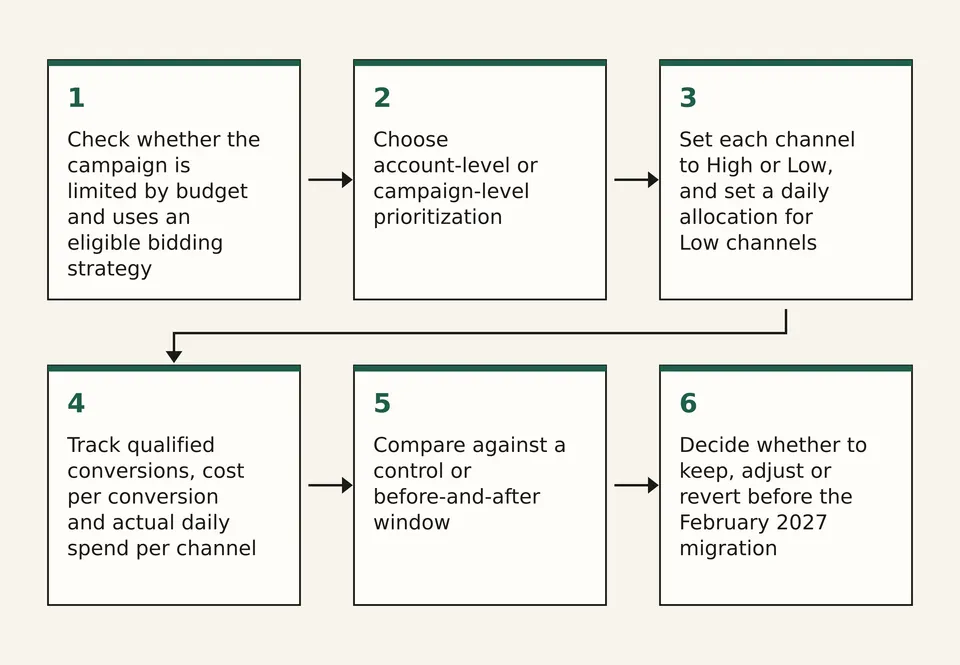
Use this sequence to judge whether the setting helped:
- Check whether the campaign is limited by budget and uses an eligible bidding strategy.
- Choose account-level or campaign-level prioritisation.
- Set each channel to High or Low, and set a daily allocation for Low channels.
- Track qualified conversions, cost per conversion and actual daily spend per channel.
- Compare against a control or before-and-after window.
- Decide whether to keep, adjust or revert before the February 2027 migration.
The following points are our recommendations, not source statements.
- Keep a control. Use a comparable campaign, or a before-and-after window with the same bidding strategy and budget.
- Log cap breaches. Record the daily cap and actual spend for each Low-priority channel, and note any day spend exceeded it, since Google says this can happen2.
- Set a stop rule before starting. For example, a cost-per-conversion ceiling. Do not decide from spend share alone, which Practical Ecommerce says does not tell you whether to prioritise1.
- Allow enough time. A two-to-four-week window is likely too short for a low-volume store. Extend the test until conversion counts support a comparison. Our guide on retail media ROAS and incrementality design covers how to structure a fair comparison.
What this means for a small store
Our reading is that for a small store, the practical change is a ceiling on secondary inventory, not a new way to buy traffic. The setting moves spend only where a campaign is actually short of budget and the bidding strategy allows it2. The sources do not show that the feature improves results. They describe how budget is distributed.
Stores most likely to benefit from testing are those that opted out of Search partners or Display, or that run multi-channel campaigns with a clear view of conversions by channel. Stores with a single Shopping or Search campaign are unlikely to see a change.
What to watch next
- Rollout timing. Google says the features roll out progressively3,4. Check whether your account shows the settings.
- API and Editor support. Relevant Audience reports that the Help page lists API and Google Ads Editor support as coming soon4. Stores that manage bids through tools will need to wait or make changes in the interface.
- Manager accounts. According to Relevant Audience's summary of the Help page, the setting cannot be applied from a manager account4. Multi-account operators must set it account by account.
- February 2027 Display change. From February 2027, Search campaigns with the Google Display Network turned on will lose their current spend allocation setup, and spend may shift3. Google says advertisers can set the Display Network to Low priority with a 50% budget allocation to keep their current configuration3. Decide before the migration whether to keep that setup or test a different one.
- Conversion mix. No source reviewed here shows whether the settings change the mix of conversions, rather than only the mix of spend. The test in the previous section is designed to answer that question.
Questions readers ask
Will channel priority move budget in a single Shopping or Search campaign?
Shopping campaigns can only tier Google Search and Search partners, and a single campaign with no partner or Display traffic has little to tier4. Budget only moves where a campaign is short of budget and the bidding strategy allows it2.
Sources
- Google Ads Loosens Channel Restrictions Primary source
- About channel prioritization and budget allocation - Google Ads Help
- Guide your campaign spending with new priority and allocation features
- Google Ads channel prioritization and budget caps
- Google Ads Channel Prioritization: Where Should Budget Go?