
Platforms · Guide
Walmart Sparky: six pre-peak checks for US Marketplace listings
Walmart has published no Sparky-specific data requirement, so these six checks apply its general Marketplace content rules to titles, key features, images and attributes before the holiday peak.
- By
- The Cart Plot Editorial
- Published
- Sources checked
- Evidence
- 7 sources
At a glance
- Walmart has not published a Sparky-specific data requirement for Marketplace sellers, so the checks rely on its general content rules3,4.
- Titles must not exceed 150 characters and must not include promotional claims such as free shipping or Black Friday4.
- Main images need a seamless white background at 255/255/255 RGB, a 1:1 aspect ratio and a file size of 5MB or less3.
- Key features should number three to 10, with each no more than 80 characters including spaces4.
- Walmart's Attributes with Issues filter shows which attributes to edit, though some can only be updated by the brand owner or authorised resellers6.

Walmart has not published a Sparky-specific data requirement for Marketplace sellers. A small US seller can prepare for the holiday peak by applying Walmart's general content rules, because no Sparky-specific rule is published. Walmart announced the Sparky features on 30 October 2026, and Retail Dive reported on 5 November 2026 that they are available now for US customers2,1. The checks below come from Walmart's Marketplace Learn and Developer Portal pages, checked on 6 November 2026.
What has Walmart actually confirmed about Sparky?
Walmart has confirmed what Sparky does for shoppers, not how it reads seller listings. Sparky is Walmart's AI shopping agent. A shopper can upload a photo, and Sparky can identify what they need, recommend products and help get them delivered in as little as 30 minutes2.
The list feature works in a similar way. A shopper takes a picture of a handwritten list or exports a list from the Notes app, and Sparky builds a shopping cart from it2. Retail Dive attributes a 57% spike in conversion for visual search compared with text-based search to Walmart's US CEO, David Guggina1.
Both sources are written for shoppers, not sellers. Walmart's newsroom post is a consumer announcement2, and Retail Dive is trade press reporting on it1. Neither describes what product data a seller must supply.
Which Walmart rules apply to Sparky-facing product data?
The closest Walmart document is the Product details policy. It says that a product's title, description, key features, images and additional attributes help determine how items appear in search and browse results on Walmart.com4. Because Sparky is a search and shopping tool, these general rules are the most relevant current guidance. This is our reading, not a rule Walmart states for Sparky.
The policy also requires attribute values to match each attribute's unit of measure, and it asks sellers to fill in as many attributes as possible when accurate information is available4. Content generated by artificial intelligence must be truthful, accurate and not misleading4.
Content priority is a further constraint. Walmart gives priority to content from brand owners and their authorised resellers when selecting item content5. If a store does not hold those privileges, it may be unable to update some content fields, including blank fields5. We recommend that a store which is not the brand owner treats its own complete attributes and clean images as the main way to compete for the listing.
How do you check titles and key features?
Titles and key features have explicit limits in the Product details policy4. A title should not exceed 150 characters4. It must not include promotional claims such as "free shipping", "best-selling" or "Black Friday"4, and it must not include special characters such as ~, !, * or $4.
Key features should list three to 10 of the most important benefits and features of the item, and each key feature must not be more than 80 characters, spaces included4.
Illustrative example, not a real listing: a title of 162 characters would fail the 150-character limit and need shortening before upload. A key feature of 84 characters would fail the 80-character limit. Count every title in your feed, not only the top sellers.
Walmart offers AI-powered content suggestions for product title, site description and key features5. Accept a suggestion only after you have checked each factual claim against the physical product. The policy makes the seller responsible for reviewing and substantiating AI-generated content before publication4.
How do you check main images and the rest of the image set?
Walmart's Image guidelines page, last updated on 12 May 2026, is the reference for images3. It recommends pixel dimensions of 2200px x 2200px, with 1500px x 1500px as the minimum for zoom3.
The main image needs a seamless white background at 255/255/255 RGB3, a 1:1 aspect ratio3, and a file size of 5MB or less3. Accepted formats are JPEG, JPG, PNG and BMP; GIF is not permitted3. The main image cannot show accessories that are not included with the item3, and it cannot show a watermark, your name or your logo3.
For the rest of the set, images must not show out-of-stock or sold-out status3, and they must not include languages other than English3. Walmart recommends a minimum of four images for each listing3 and recommends the 14-digit GTIN in the file name3. If you use Walmart's image hosting, image URLs must end in an image file type, and URLs that contain a query are unsupported3. AI-generated images must be truthful, accurate and not misleading3. Check any AI-edited image against the physical product before upload.
| Check | Walmart rule | Source | Page date |
|---|---|---|---|
| Title length | Not exceeding 150 characters4 | 4 | 6 October 2026 |
| Key features | Three to 10, each no more than 80 characters4 | 4 | 6 October 2026 |
| Main image background | Seamless white, 255/255/255 RGB3 | 3 | 12 May 2026 |
| Main image shape and size | 1:1 aspect ratio, 5MB or less3 | 3 | 12 May 2026 |
| File format | JPEG, JPG, PNG or BMP; GIF not permitted3 | 3 | 12 May 2026 |
| Image count | Minimum of four recommended3 | 3 | 12 May 2026 |
| Attribute values | Must correspond with each unit of measure4 | 4 | 6 October 2026 |
How do you fill and check attributes?
Walmart's tools show where attributes are incomplete. The Bulk Attribute Editor helps improve a store's Content quality score, which is one of the key components of its overall Listing Quality score6. On the Listing Quality dashboard, the "Attributes with Issues" filter selects attributes that need to be edited to improve the Listing Quality score6. You create a spreadsheet from the filter, edit the values, and upload the file back to the dashboard6.
Two limits apply. Some attributes can only be updated by the brand owner or authorised resellers6. Also, a score may not update immediately, and newly published offers may take up to a week to appear in the Listing Quality dashboard6.
The Developer Portal lists a "Get item setup requirements" page under Items7. The routine below refers to this page by its listed name.
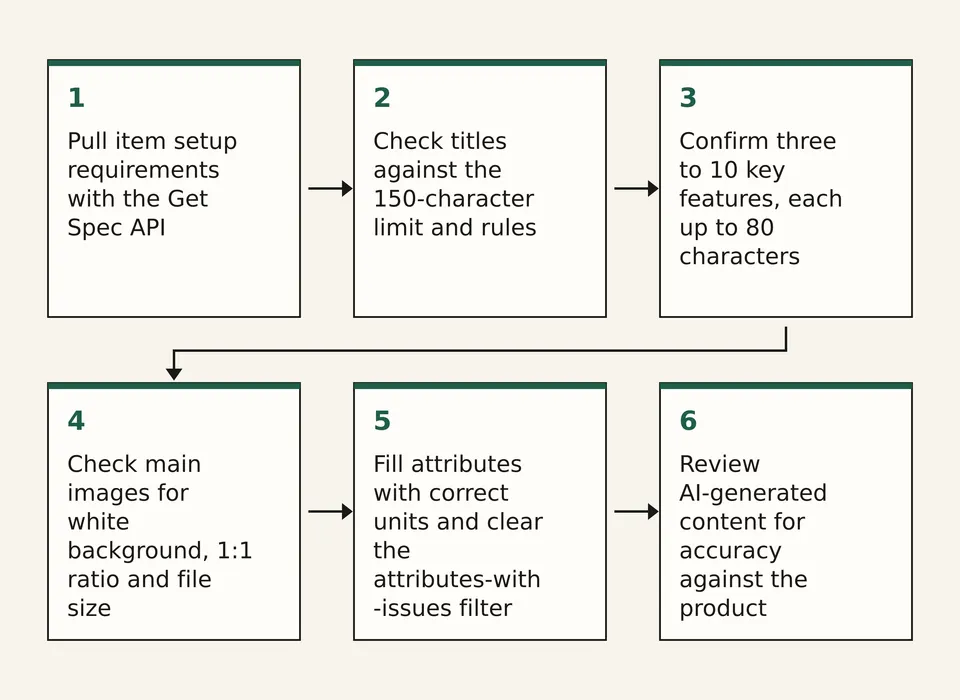
What is the six-step pre-peak routine?
The routine below runs the checks above in six steps. A small store can complete it in a spreadsheet, with one row for each listing.

- Step 1: Pull item setup requirements from the Get item setup requirements page7
- Step 2: Check titles against the 150-character limit and rules4
- Step 3: Confirm three to 10 key features, each up to 80 characters4
- Step 4: Check main images for white background, 1:1 ratio and file size3
- Step 5: Fill attributes with correct units and clear the attributes-with-issues filter4,6
- Step 6: Review AI-generated content for accuracy against the product4
We recommend keeping a dated record of each check, so you can show what changed before the holiday peak.
What should you leave unverified?
None of the Walmart seller pages we reviewed names a Sparky-specific data requirement. None of the six steps is therefore a confirmed Sparky rule. Each step rests on Walmart's general content rules3,4.
The Walmart and Retail Dive reports do not say how visual matching treats seller images beyond what the general image rules cover.
Walmart's pages can change. Re-check the Image guidelines page, last updated on 12 May 20263, and the Product details policy, last updated on 6 October 20264, before each major sales event. For context on Walmart's wider AI shopping changes, see Walmart lets AI agents buy for shoppers within set spending limits.
Questions readers ask
Does Walmart publish a Sparky-specific data requirement for sellers?
No. None of the Walmart seller pages reviewed names a Sparky-specific data requirement, so each check rests on Walmart's general content rules3,4.
What is the title limit on Walmart Marketplace?
A title should not exceed 150 characters, and it must not include promotional claims such as free shipping, best-selling or Black Friday4.
What are the main image specifications?
The main image needs a seamless white background at 255/255/255 RGB, a 1:1 aspect ratio and a file size of 5MB or less. JPEG, JPG, PNG and BMP are accepted, but GIF is not3.