
Conversion · Guide
Adding Klarna before Black Friday: six checks before a store decides
A store without Klarna should complete six checks before deciding, because the Klarna pages retrieved on 29 October 2026 showed only navigation, so option, fee and wording points rest on a secondary source. easyShop reported adding Klarna across 19 European markets ahead of Black Friday [S1].
- By
- The Cart Plot Editorial
- Published
- Sources checked
- Evidence
- 5 sources
At a glance
- Klarna decides which payment options each customer sees, and merchants cannot choose the option a particular shopper is offered5.
- Klarna charges merchants a fee per transaction, typically a percentage of order value sometimes plus a fixed amount, and no Klarna source reviewed publishes a merchant rate5.
- PayFasto reports that Klarna requires specific wording about payment terms on merchant websites, so store owners should use Klarna's logo and copy as published5.
- ChannelX reported on 29 October 2026 that easyShop added Klarna across 19 European markets with Pay in Full, Pay in 3 and Pay in 30 options1.
- The Klarna placement and go-live pages were listed in navigation but their content was not retrieved, so placement rules and test steps are unconfirmed2,3.

This guide does not recommend adding Klarna before Black Friday. It sets out the checks a store should complete before deciding. The rules and pages described were checked on 29 October 2026. The Klarna pages retrieved that day showed only navigation menus and no publication date, so the option, fee and wording points below rest on a secondary source, PayFasto, and have not been confirmed against Klarna's own documentation. On 29 October 2026, ChannelX reported that easyShop had added Klarna across 19 European markets ahead of Black Friday1.
Should a store that does not yet offer Klarna add it before Black Friday?
Klarna is a payment provider that lets consumers pay using methods saved to their Klarna account4. For a merchant, the decision turns on four things: whether the store is approved for Klarna in each market, what each order costs, how the offer is shown to shoppers, and whether the store can switch it off quickly if something goes wrong.
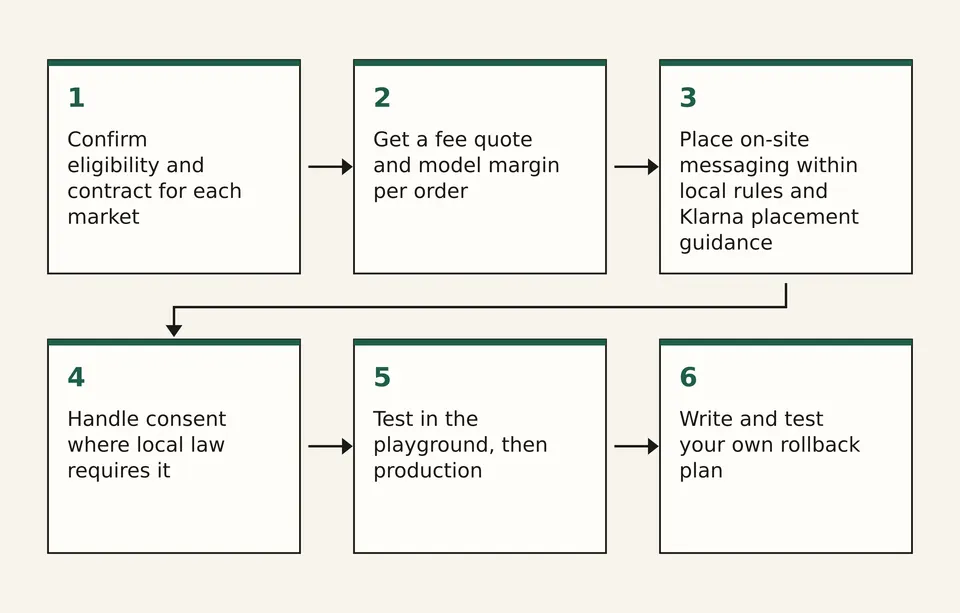
The six steps below follow that order. Work through them in sequence, because later steps depend on earlier answers.
- Confirm eligibility and contract for each market.
- Get a fee quote and model margin per order.
- Place on-site messaging within local rules and Klarna placement guidance.
- Handle consent where local law requires it.
- Test in the playground, then production.
- Write and test your own rollback plan.
Step 1: How do you confirm eligibility and contract for each market?
Start by confirming which Klarna options your store is approved to offer, market by market. PayFasto describes three options: Pay in Full, pay later (typically within 30 days) and pay over time in instalments or with financing5. Klarna decides which options each customer sees, and merchants cannot choose which option a particular customer is offered5.
We think eligibility and the list of contracted options should be confirmed in writing with Klarna or your payment provider. Ask for three things for each market you sell in:
- the exact options you are approved for;
- the settlement terms, including when Klarna pays you;
- any wording Klarna requires on your site.
Step 2: How do you decide fees per order?
Klarna charges merchants a fee on each transaction. PayFasto reports that Klarna's revenue comes largely from merchants, who typically pay a percentage of the order value, sometimes with a fixed amount per transaction5. The rate depends on the country you sell in, the payment options you offer, your industry, order values and volumes, and whether you contract directly or through a payment provider5.
No Klarna source reviewed for this guide publishes a merchant fee rate, so none is quoted here. PayFasto advises asking for a quote rather than relying on published examples5. We think the quote should be used to model margin on your own figures, repeated for your typical basket sizes and product mix.
PayFasto also notes that Klarna is often more expensive per transaction than debit cards or bank payments, and that merchants accept this because Klarna can increase conversion and order values5. Whether that trade-off works for your store is a judgement you have to make from your own numbers.
Step 3: What placement and wording rules apply to on-site messaging?
Klarna's documentation has separate pages for on-site messaging and placements2,3. The retrieved versions showed only navigation menus, so this guide could not confirm placement rules from them. The title of one page, "Product and cart placements", indicates that placements cover product and cart pages, but its content was not retrieved3.
PayFasto reports that Klarna requires certain wording about its payment terms on your website5. We think the logo and copy should be used exactly as Klarna publishes them, and that payment terms should not be paraphrased or extended with claims about what shoppers will be charged.
Local advertising rules can also apply to messaging, so check each market's requirements before the messaging goes live.
Step 4: Who handles consent?
No source reviewed for this guide sets out consent duties for Klarna messaging. Whether consent is needed depends on local law in each market and on how the store uses shopper data in its messaging there. We think the store should take legal advice for each market before it publishes.
Step 5: How do you test before going live?
Test every option and market you plan to show before shoppers see it. Using easyShop's rollout as an example, the options to check are Pay in Full, Pay in 3 and Pay in 301. We recommend checking each one separately in each market where the store sells, and running checkout tests in whatever test environment your provider offers. Klarna's documentation navigation lists a "Testing conversion boosters" page and a "Go-live checklist"2, but the content of those pages was not retrieved, so their steps are not described here. Move to live traffic only after those tests pass.

After launch, check the live product, cart and checkout pages in each market to confirm that the right options and wording appear.
Step 6: What is your rollback plan?
No source reviewed for this guide describes how to switch off Klarna at checkout. Klarna's documentation navigation lists a "Disable Session" action2, but that page was not retrieved, so this guide does not describe how it works.
We think the store should write its own plan. It should name who can disable each Klarna option, how long that takes, and which messaging is removed with it. For example, if one market's Pay in 30 option must be removed while Pay in Full stays live, the plan should show how that is done. Test the switch-off in a test environment before peak trading starts. Ask Klarna or your payment provider how a method is removed from the live checkout, and keep their answer on file.
What does easyShop's rollout tell you, and what does it not?
ChannelX reports that easyShop, a new online marketplace from the easy family of brands, added Klarna to checkout across 19 European markets1. Customers can choose Pay in Full, Pay in 3 or Pay in 30, and ChannelX states that all three options are interest free1.
This is one marketplace's rollout. Its terms, fees and approved options do not transfer to other merchants. The announcement also tied the partnership to easyShop's launch earlier that month and to its first peak trading period1. A store should use the example only to see what one platform chose to offer, then complete Steps 1 to 6 for its own contract and markets.
Before you publish
- Confirm the Klarna pages cited here on Klarna's merchant site, since the versions retrieved showed only navigation menus and no publication date2,3.
- Confirm your contract, approved options and fee quote for every market.
- Confirm local advertising and consent requirements for each market.
- Complete test checkouts and check live pages after launch.
- Keep a rollback plan that has been tested before Black Friday traffic arrives.
For related context on Black Friday timing, see Walmart vs Target, Best Buy and Amazon: published Black Friday dates. For a comparison of first UK listing options that includes easyShop, see easyShop, refurbed or Walmart for a first UK listing: what the pages show.
Questions readers ask
Does Klarna charge merchants a fixed rate?
Klarna charges merchants a fee on each transaction. PayFasto reports that this is typically a percentage of order value, sometimes with a fixed amount per transaction, and the rate depends on country, options offered, industry and volumes5.
Which Klarna options did easyShop offer?
ChannelX reports that easyShop offered Pay in Full, Pay in 3 and Pay in 30 across 19 European markets, and states that all three are interest free1. These terms do not transfer to other merchants.
Who decides which Klarna option a shopper sees?
Klarna decides which options each customer sees, and merchants cannot choose which option a particular customer is offered5.